睡觉想飞2025-02-18 07:02
google ads api 关键字获取小脚本
效果: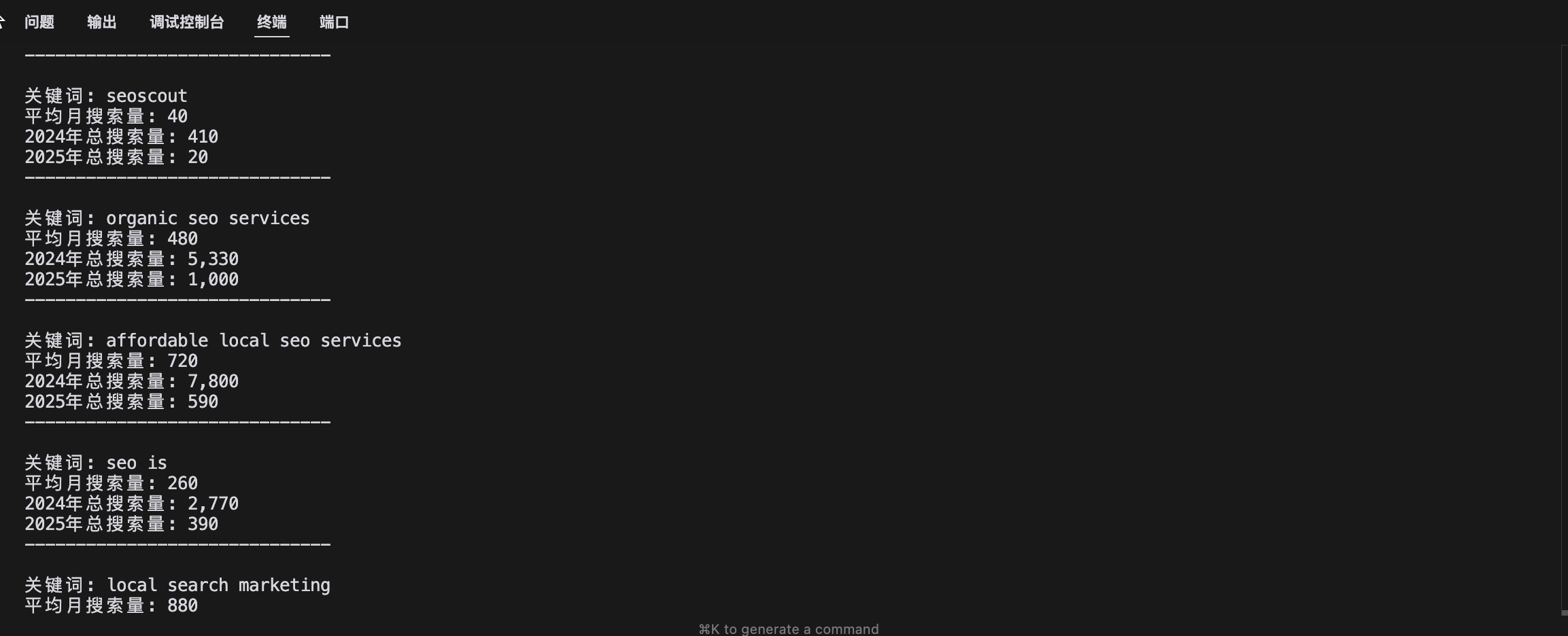
很抱歉不能写详细的教程,这里面他的 token 获取很折腾,我也是谷歌了很久才弄好来,脚本还可以改进,大家可以根据自己的需求改改,
这脚本的门槛在 token 获取,比较折腾。api 是免费的(相对来说)。
我发这些希望不会触及到各位大佬的利益!!!
脚本要配合下面的参考资料食用,
参考资料
https://juejin.cn/post/7297831676631466021#heading-2
https://www.youtube.com/watch?v=HXKpfGqPRy0
https://developers.google.com/google-ads/api/docs/start?hl=zh-cn
https://github.com/googleads/google-ads-php
import requests
import json
from typing import Dict, Any
from collections import defaultdict

def get_access_token() -> str:
    """获取新的 access token"""
    token_url = "https://oauth2.googleapis.com/token"
    data = {
        # OAuth 2.0 客户端 ID
        # 用于标识你的应用程序,从 Google Cloud Console 获取
        "client_id": "xxx-xxx.apps.googleusercontent.com",

        # OAuth 2.0 客户端密钥
        # 用于验证你的应用程序身份,需要保密
        "client_secret": "xxx",

        # 刷新令牌
        # 用于获取新的访问令牌,长期有效,不会过期
        # 通过 OAuth 2.0 授权流程获得
        "refresh_token": "xxx",

        # 授权类型
        # 指定使用刷新令牌获取新的访问令牌
        "grant_type": "refresh_token"
    }

    response = requests.post(token_url, data=data)
    return response.json()["access_token"]

def analyze_search_volumes(result: Dict) -> None:
    """分析搜索量数据"""
    if "results" not in result:
        return

    print("\n搜索量分析:")
    print("-" * 50)

    for keyword_data in result["results"]:
        metrics = keyword_data["keywordIdeaMetrics"]
        keyword = keyword_data["text"]

        # 获取年度总搜索量
        yearly_searches = defaultdict(int)
        for volume in metrics["monthlySearchVolumes"]:
            yearly_searches[volume["year"]] += int(volume["monthlySearches"])

        # 打印结果
        print(f"\n关键词: {keyword}")
        print(f"平均月搜索量: {metrics['avgMonthlySearches']}")
        for year, total in yearly_searches.items():
            print(f"{year}年总搜索量: {total:,}")
        print("-" * 30)

def get_keyword_ideas(customer_id: str, keyword: str, access_token: str) -> Dict[str, Any]:
    """获取关键词建议"""
    url = f"https://googleads.googleapis.com/v18/customers/{customer_id}:generateKeywordIdeas"

    headers = {
        # 访问令牌
        # 用于验证 API 请求,有效期通常为 1 小时
        "Authorization": f"Bearer {access_token}",

        # Google Ads API 开发者令牌
        # 用于识别你的 Google Ads API 应用
        "developer-token": "xxxx",

        # Google Ads 管理员账户 ID,测经理身份ID
        # 如果要访问客户账号,需要提供管理员账号 ID 123-123-1234 类似这样,在账号的右上角的 id,
        "login-customer-id": "4176332570",

        "Content-Type": "application/json"
    }

    data = {
        "keyword_seed": {
            "keywords": [keyword]
        },
        "language": "languageConstants/1000",  # 英语
        "geo_target_constants": ["geoTargetConstants/2840"],  # 美国
        "keyword_plan_network": "GOOGLE_SEARCH_AND_PARTNERS"
    }

    response = requests.post(url, headers=headers, json=data)
    return response.json()

def main():
    # 获取新的 access token
    access_token = get_access_token()
    print("获取到新的 access token")

    # 设置参数 这里是 测经理身份ID创建的测试用户 id,
    customer_id = "1961763003"
    keyword = "seo"

    # 获取关键词建议
    print(f"\n获取关键词 '{keyword}' 的建议...")
    result = get_keyword_ideas(customer_id, keyword, access_token)

    # 分析结果
    if "error" in result:
        print("\n请求失败:")
        print(f"错误代码: {result['error'].get('code')}")
        print(f"错误信息: {result['error'].get('message')}")
        print(f"错误状态: {result['error'].get('status')}")
    else:
        analyze_search_volumes(result)

if __name__ == "__main__":
    main()
Google Ads 关键词分析工具说明文档
功能概述
这个脚本用于通过 Google Ads API 获取关键词的搜索量数据和相关指标。它可以帮助你:
- 获取特定关键词的搜索量数据
- 分析关键词的竞争度
- 查看建议出价范围
- 获取月度和年度搜索趋势
前提条件
1. Google Ads API 认证信息
需要以下认证信息:
-
client_id: OAuth 2.0 客户端 ID- 从 Google Cloud Console 获取
- 用于标识你的应用程序
-
client_secret: OAuth 2.0 客户端密钥- 与客户端 ID 配对的密钥
- 需要妥善保管,不要泄露
-
refresh_token: 刷新令牌- 通过 OAuth 2.0 授权流程获得
- 长期有效,用于获取新的访问令牌
-
developer-token: Google Ads API 开发者令牌- 用于访问 Google Ads API
- 需要在 Google Ads 后台申请
2. Google Ads 账号信息
需要两个重要的 ID:
-
login-customer-id: 管理员账户 ID- 位于账号右上角
- 格式类似:417-633-2570
-
customer_id: 客户账户 ID- 要查询数据的账户 ID
脚本结构
1. 主要函数
-
get_access_token():- 获取新的访问令牌
- 使用 refresh_token 交换新的 access_token
-
get_keyword_ideas():- 调用 Google Ads API 获取关键词数据
- 支持设置语言和地区
-
analyze_search_volumes():- 分析搜索量数据
- 计算年度总搜索量
- 展示月度趋势
2. 数据维度
获取的关键词数据包括:
- 平均月搜索量
- 竞争度(低/中/高)
- 竞争指数(0-100)
- 建议出价范围
- 月度搜索量趋势
使用方法
- 安装依赖:
pip install requests
- 配置认证信息:
- 填写正确的 client_id 和 client_secret
- 配置有效的 refresh_token
- 设置正确的 developer-token
- 运行脚本:
python google_keywords_raw.py
输出说明
脚本会生成一个包含以下内容的分析报告:
- 关键词基本信息
- 搜索量统计
- 月度搜索趋势
- 竞争度分析
注意事项
- 请妥善保管所有认证信息
- access_token 有效期通常为1小时
- 建议使用英文关键词查询
- API 有调用频率限制
常见问题
- 认证失败:检查认证信息是否正确
- 数据不完整:某些字段可能不是所有关键词都有
- 请求限制:注意 API 调用频率限制
以上,我是睡飞,我在 6 群,大家多交流一起成长进步!!!
评论区